
What's Changed? Skill Builder - AU version1.3 - App Store
You'll be able to see results in few seconds.
Publisher Description
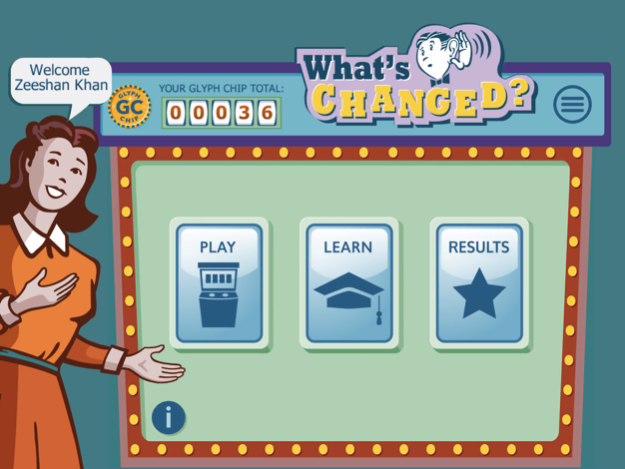


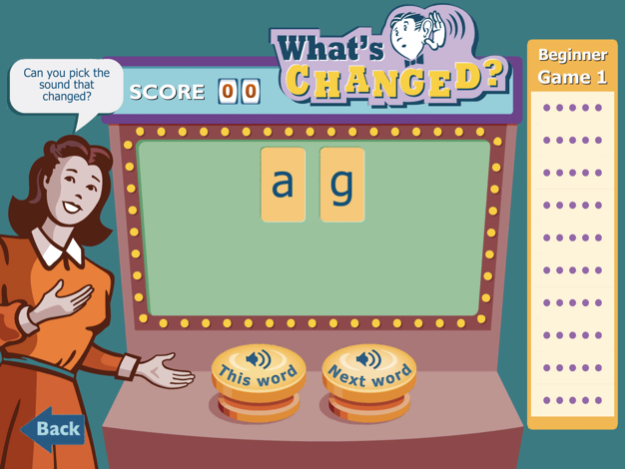
The What’s Changed? skill builder has been specifically designed to develop students’ phonemic awareness - the ability to discern the sounds, and the sequence of sounds, within a word. Phonemic awareness is a critical skill for learning to read and can be improved with practice.
What’s Changed? focuses on developing phonemic awareness with vowel sounds and consonant blends through exercises that require students to listen to two non-words and identify what changed between the two words.
Students develop the core foundational skills that make up phonemic awareness by identifying the type of change that occurred, including:
- identifying the sound that changed (‘zat’ to ‘zad’)
- substituting a new letter for the sound that changed (‘feld’ to ‘fald’)
- specifying the letter for a sound that was added or omitted (‘strek’ to ‘stek’)
- switching two letters for sounds that were switched (‘blist’ to ‘blits’)
Students with poor phonemic awareness skills often make these types of errors when reading.
What’s Changed? also develops segmentation and blending skills - the ability to segment a word into its individual sounds and then blend the sounds together for whole word reading. These skills are also essential for successfully learning how to read, as they enable students to blends sounds together in order to recognise whole words when reading.
What’s Changed? is suitable for students of all ages, particularly emerging readers and struggling readers. It is also good for English language learners wanting to improve their auditory discrimination and pronunciation of English. Parents or teachers can monitor students’ progress, and pinpoint weaker areas by looking at the results for each skill type.
There are three different categories in What’s Changed?, each with four increasing levels of difficulty. Within each game, the words build from VC (e.g. ‘ob’) to CCVCC (e.g. ‘brisp’). The Standard English category develops letter-sound knowledge for the most common sounds of letters (for example, the /k/ sound of the letter ‘c’ as in ‘cat’).
The Readable English category builds on from the Standard English category, including the non-standard sounds of letters (for example, the other sounds the letter ‘c’ can make such as in ‘cell’, ‘ocean’ and ‘cello’). In Readable English when a letter makes a sound other than its usual sound, it is marked with a glyph, enabling all the sounds of English to be represented by distinct characters (e.g. the different sounds of the letter ‘o’ in ‘cove’, ‘love’ and ‘move’ are clearly reflected with different glyphs).
The Colour category uses only colours to represent sounds, which requires users to strictly focus on auditory discrimination rather than sound-symbol association.
Readable English: Read It | Speak It | Know It.
Sep 17, 2015
Version 1.3
This app has been updated by Apple to display the Apple Watch app icon.
Minor Improvements and Bug Fixes.
About What's Changed? Skill Builder - AU version
The company that develops What's Changed? Skill Builder - AU version is Accessible Publishing Systems Pty. Limited. The latest version released by its developer is 1.3.
To install What's Changed? Skill Builder - AU version on your iOS device, just click the green Continue To App button above to start the installation process. The app is listed on our website since 2015-09-17 and was downloaded 0 times. We have already checked if the download link is safe, however for your own protection we recommend that you scan the downloaded app with your antivirus. Your antivirus may detect the What's Changed? Skill Builder - AU version as malware if the download link is broken.
How to install What's Changed? Skill Builder - AU version on your iOS device:
- Click on the Continue To App button on our website. This will redirect you to the App Store.
- Once the What's Changed? Skill Builder - AU version is shown in the iTunes listing of your iOS device, you can start its download and installation. Tap on the GET button to the right of the app to start downloading it.
- If you are not logged-in the iOS appstore app, you'll be prompted for your your Apple ID and/or password.
- After What's Changed? Skill Builder - AU version is downloaded, you'll see an INSTALL button to the right. Tap on it to start the actual installation of the iOS app.
- Once installation is finished you can tap on the OPEN button to start it. Its icon will also be added to your device home screen.
Program Details
System requirements
Download information
Pricing
Version History
version 1.3
posted on 2015-09-17
Sep 17, 2015 Version 1.3
Minor Improvements and Bug Fixes.
version 1.3
posted on 2015-09-17
Sep 17, 2015 Version 1.3
This app has been updated by Apple to use the latest Apple signing certificate.
Minor Improvements and Bug Fixes.
version 1.3
posted on 2015-09-17
Sep 17, 2015 Version 1.3
This app has been updated by Apple to display the Apple Watch app icon.
Minor Improvements and Bug Fixes.
version 1.3
posted on 2015-03-10
version 1.3
posted on 1970-01-01
17 de sep. de 2015 Version 1.3
This app has been updated by Apple to use the latest Apple signing certificate.
Minor Improvements and Bug Fixes.
Disclaimer
Official App Store Link
We do not host What's Changed? Skill Builder - AU version on our servers. We did not scan it for viruses, adware, spyware or other type of malware. This app is hosted by Apple and passed their terms and conditions to be listed there. We recommend caution when installing it.
The App Store link for What's Changed? Skill Builder - AU version is provided to you by apps112.com without any warranties, representations or guarantees of any kind, so access it at your own risk.
If you have questions regarding this particular app contact the publisher directly. For questions about the functionalities of apps112.com contact us.
